
How to send an E-Transfer
E-Transfer Address:
churches@fmcic.ca
No Password Needed
You can send CORE Ministry Funds to FMCIC via e-transfer by following the steps below:
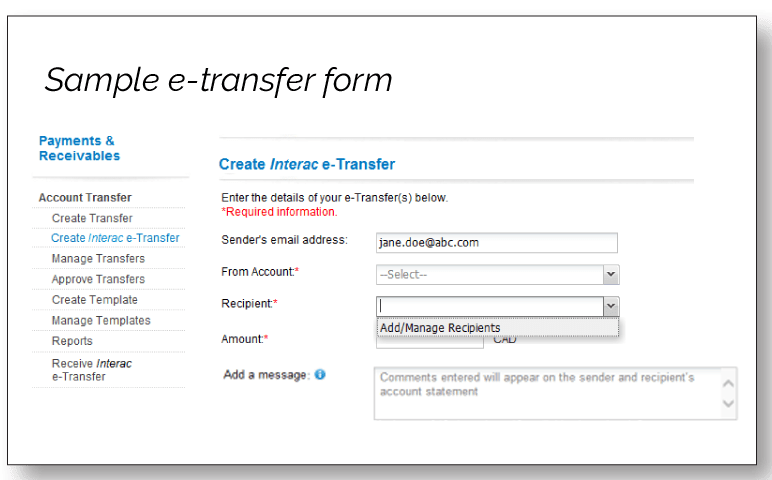
- Select “Create Interac e-Transfer” from the account transfer/payment menu tab of your bank’s website.
- Choose the account to transfer money from, the recipient email churches@fmcic.ca, and enter the amount.
The first time you send your FMCIC Ministry Funds via e-transfer, you will need to add The Free Methodist Church in Canada as a new e-transfer recipient using this email address: churches@fmcic.ca.
Please note that FMCIC has Auto Deposit setup and thus, no security questions or passwords are necessary. - Enter your contact information in the memo field, and then complete/send the e-Transfer.
IMPORTANT – Please include in the memo field any designations. If there are multiple designations, please email the Remittance Form with the breakdown of your FMCIC Ministry Funds to finance@fmcic.ca.
Thank you for giving and supporting Our Ministry Together!
Churches with 2-signature accounts sending e-Transfer
Churches with 2-signature accounts sending e-Transfer
It is best practice for churches to require 2-signatures on cheques. (Please do not open an account with only one signature just for e-transfer.)
We are suggesting the following workaround in order to send in your church giving through e-transfer and maintain the 2-signature compliance:
Create a simple Payment Requisition Form in WORD which provides the necessary details and have the 2 required signatures sign this form. Once signed, you can use this form to authorize and send the e-transfer. Keep the Payment Requisition Form as your backup documentation for any audit.